See Repair Photos and Approve Work: Digital Vehicle Inspection in Richardson
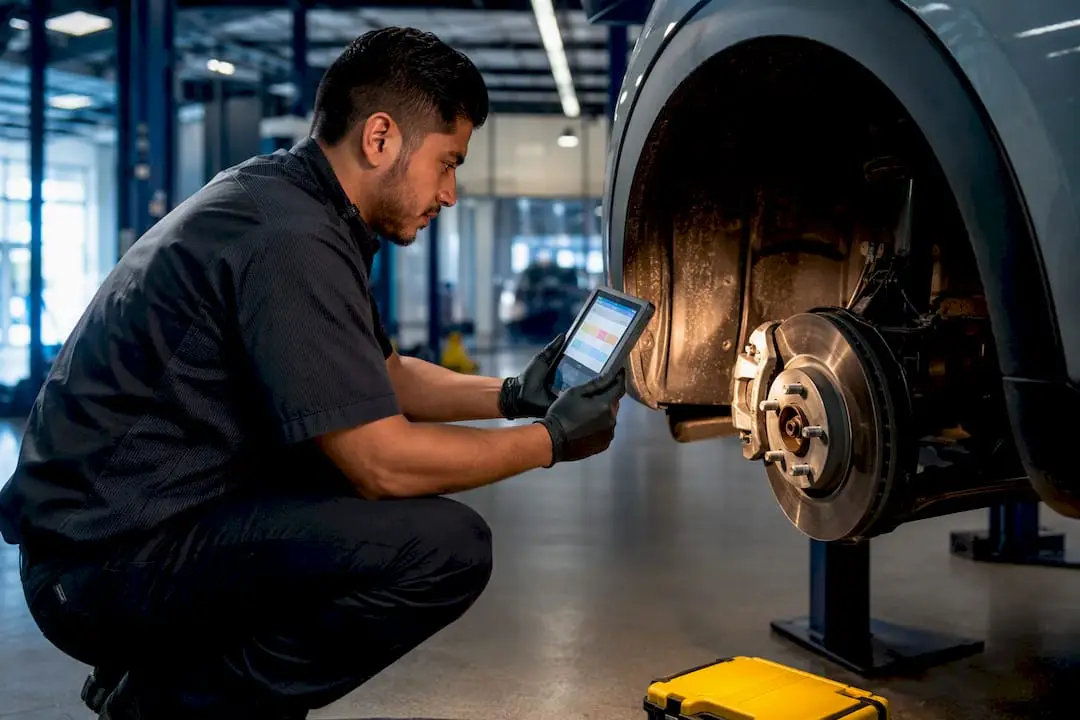
A digital vehicle inspection, or DVI, is a photo- and video-backed check your technician runs on a tablet, then sends straight to your phone. You see the same brake pad, tire, or leak the technician sees, rate the urgency with a simple color code, and approve or decline each item remotely. The main payoff is trust: no guessing what “your brakes need attention” actually means.
TL;DR:
- Clear, well-lit photos paired with specific measurements and notes are essential for a trustworthy and actionable digital vehicle inspection.
- A well-trained technician with ASE certification and ongoing software coaching ensures consistency and accuracy in DVI reports.
- Integration with shop management systems speeds up approvals, reduces errors, and helps track component conditions across multiple visits.
- Virtual inspections are suitable for surface-level checks but cannot replace in-person assessments for suspension, engine, or emissions issues.
- The quality of a DVI depends more on shop discipline and workflow than on the specific software or hardware used.
Table of Contents
- What Is a Digital Vehicle Inspection (DVI)?
- How a DVI Works: Step-by-Step Walkthrough
- What a DVI Typically Inspects
- Benefits of Digital Vehicle Inspections for Vehicle Owners and Shops
- Virtual Inspections vs. In-Person DVI: What Each Can (and Can’t) Do
- How Shops Make a DVI Useful: Quality Signals and What to Ask
- Kwik Kar’s Approach to Digital Vehicle Inspections
- Integrating DVI Systems With Shop Management Software and CRM
- Data Security and Privacy in Digital Vehicle Inspections
- Training and Certification for Technicians Performing DVIs
- Challenges and Limits of Implementing DVIs in Automotive Shops
- Best Practices and Examples of Successful DVI Adoption
- What Actually Matters When You’re Evaluating a DVI
- Book a Digital Vehicle Inspection at Kwik Kar in Richardson
- Sources
- FAQ
What Is a Digital Vehicle Inspection (DVI)?
A digital vehicle inspection replaces a paper checklist with a tablet or phone app that a technician carries through the bay. Instead of scribbling notes a customer never sees, the technician photographs or films specific components, tags each with a condition rating, and attaches short notes explaining what the camera caught.
Most shops use a traffic light system to communicate urgency at a glance:
- Green means the component is in good condition and needs no action now.
- Yellow flags something worth watching or scheduling soon, like a tire nearing its wear bar.
- Red signals a safety or reliability concern that needs attention before you drive much further.
That color coding turns a wall of technical jargon into something you can understand in seconds, even if you have never opened a hood.
One distinction trips up a lot of drivers: a DVI is not the same as a DVIR. A Driver Vehicle Inspection Report is a mandatory document commercial drivers complete under federal trucking rules, governed by 49 CFR 396.11 and 396.13. A DVI is voluntary, customer-facing, and built for everyday car owners rather than fleet compliance officers. If your shop mentions a “DVI,” they mean the inspection you’re about to read on your phone, not a federal logbook entry.
How a DVI Works: Step-by-Step Walkthrough
Every digital inspection follows a similar sequence, whether you dropped off a sedan for an oil change or brought in a work truck for a full checkup. Knowing the flow helps you know what to expect the next time your phone buzzes with a report link.
- The advisor opens a repair order and selects a checklist. Different templates exist for oil changes, brake jobs, or full multi-point inspections, so the technician documents only what’s relevant to your visit.
- The technician works through the vehicle, capturing photos and videos as they go. A worn brake pad, a cracked serpentine belt, or a fluid leak gets photographed on the spot, then tagged green, yellow, or red.
- A service advisor reviews the findings, prioritizes them, and attaches pricing. This is where raw technician notes turn into a readable set of recommendations, sorted by urgency rather than a random parts list.
- You receive the report by text or email, following the same tablet-driven, photo-backed process shops increasingly rely on.
- You open the link on your phone, scroll through the photos, and approve or defer each item individually. Nobody is pressuring you to say yes to everything at once.
- Your decisions update the repair order automatically, so the shop only orders parts and starts labor on what you actually approved.
The general workflow, from checklist to media capture to advisor review to your approval, mirrors what’s documented across shop management systems built specifically for this process.
Pro Tip: Read the technician’s notes, not just the photo. A blurry close-up of a tire means less without a line explaining the measured tread depth or the specific location of a leak.
What a DVI Typically Inspects
A thorough multi-point inspection covers the systems most likely to cause a breakdown, a safety hazard, or a failed emissions check. What you see in your report depends on the visit type, but a comprehensive DVI usually touches on these areas:
- Brakes: pad thickness, rotor condition, and any fluid contamination removal practices.
- Tires: tread depth, uneven wear patterns, and correct inflation.
- Suspension: shocks, struts, and bushings for leaks or excessive play.
- Fluids: oil, coolant, transmission, and brake fluid levels and condition.
- Battery: terminal corrosion, charge level, and case swelling.
- Lighting: headlights, brake lights, and turn signals.
- Belts and hoses: cracking, fraying, or soft spots that signal age.
- Exhaust and steering components: leaks, unusual play, or corrosion.
A photo of a brake pad measured against a wear indicator tells you far more than the phrase “brakes are getting low.” The same goes for a close-up of a coolant hose showing a hairline crack, or a tire photographed next to a tread depth gauge. Shops prioritize red-tagged items tied to safety, like brakes and steering, ahead of cosmetic wear because those are the failures most likely to leave you stranded or hurt on the road. If you ever want to dig deeper into what a full inspection should cover, our vehicle inspection checklist guide breaks down each system in more detail.
Benefits of Digital Vehicle Inspections for Vehicle Owners and Shops
The clearest benefit for you as a driver is proof instead of a verbal claim. Instead of a technician telling you your brake pads are worn, you see the actual photo, which shifts the conversation from “trust me” to “look at this together.”
That shift changes behavior on both sides of the counter:
- You get a portable service history you can reference at your next visit, wherever you decide to take your car.
- You can approve or decline work from your phone without standing in a waiting room.
- Shops that adopt DVIs typically see higher approval rates and a larger average repair order, because customers approve work they can actually see rather than work described to them secondhand.
- Standardized checklists reduce disputes over what was or wasn’t inspected, since the photo timestamp settles most disagreements.
A digital inspection also builds a maintenance timeline. DVIs create a persistent digital record that tracks how a component’s condition changes across visits, which supports better long-term budgeting instead of reacting to whatever breaks first. The caveat worth keeping in mind: a DVI is only as useful as the shop’s discipline in capturing clear photos and writing real notes. A blurry photo with no explanation doesn’t build trust, it just adds a screen to tap through.
Virtual Inspections vs. In-Person DVI: What Each Can (and Can’t) Do
A virtual inspection, sometimes done over live video or from photos and video you record yourself, is a different tool than the in-shop DVI your technician performs on a lift. Virtual checks work well for a specific, limited set of tasks.
Remote inspections tend to be reliable for surface-level safety items you can see and photograph yourself:
- Headlights, brake lights, and turn signals.
- Windshield wiper condition.
- Mirror function and visible tire wear.
- Obvious exterior damage or fluid puddles under a parked car.
Where virtual inspections fall short is anything that requires a lift, a scan tool, or specialized equipment. Underbody rust, suspension play, engine diagnostics, and emissions testing all require hands-on access a phone camera can’t replicate. A virtual check is a reasonable pre-screen before a longer trip, or a quick compliance step for something like a rideshare vehicle requirement, but it’s not a substitute for a physical inspection when you suspect a mechanical problem. Use virtual for a fast sanity check, and book an in-person visit when something feels or sounds wrong.
How Shops Make a DVI Useful: Quality Signals and What to Ask
Not every digital inspection delivers the same value. The quality of a DVI depends heavily on how seriously a shop treats the process, since the technology only works as well as the workflow behind it.
Watch for these signals that a shop takes its DVI process seriously:
- Photos are clear, well lit, and show the specific measurement or defect, not just a general angle of the engine bay.
- Technician notes explain what the photo means, ideally with a number attached, like pad thickness in millimeters.
- Condition ratings are consistent and tied directly to your repair order or estimate.
- The shop keeps your inspection history on file so you can compare visits over time.
Pro Tip: If a report flags a red item, ask the advisor directly whether it’s a safety concern or a convenience recommendation. The two get treated very differently in terms of urgency, and a good advisor will tell you plainly which one you’re looking at.
Ask how declined items are tracked, too. A well-run shop keeps a record of what you deferred so nobody has to re-diagnose the same worn belt six months later.
Kwik Kar’s Approach to Digital Vehicle Inspections
At Kwik Kar Oil Change & Auto Care in Richardson, every inspection runs through ASE-certified technicians who document findings with the same photo and video backed process described throughout this article. Each flagged item ties directly to your repair order, so the pricing you see matches exactly what the technician found, not a generic estimate.
Transparent pricing sits at the center of how we operate. You’ll see the same condition ratings and notes your technician used, plus access to your inspection history for future visits, which supports the kind of preventive maintenance planning that keeps repair costs predictable. We also handle Texas state inspections alongside standard DVIs, so you’re covered for both mechanical condition and state compliance in one visit.
Military personnel and first responders receive special discounts as part of our commitment to the community. If you’re due for service, schedule an appointment and see exactly what our technicians see on your next visit.
Integrating DVI Systems With Shop Management Software and CRM
A digital inspection report doesn’t do much good sitting alone in an app. Its real value shows up once it connects to the shop’s broader systems, feeding directly into the repair order rather than requiring an advisor to manually retype every finding.
When a DVI platform integrates with shop management software, the approved items on your report populate the estimate automatically, parts get ordered against what you actually approved, and labor gets scheduled without a second round of data entry. That integration also means your service history lives in one place instead of scattered across separate tools, so an advisor pulling up your account sees not just today’s findings but a timeline of what was flagged and fixed at previous visits.
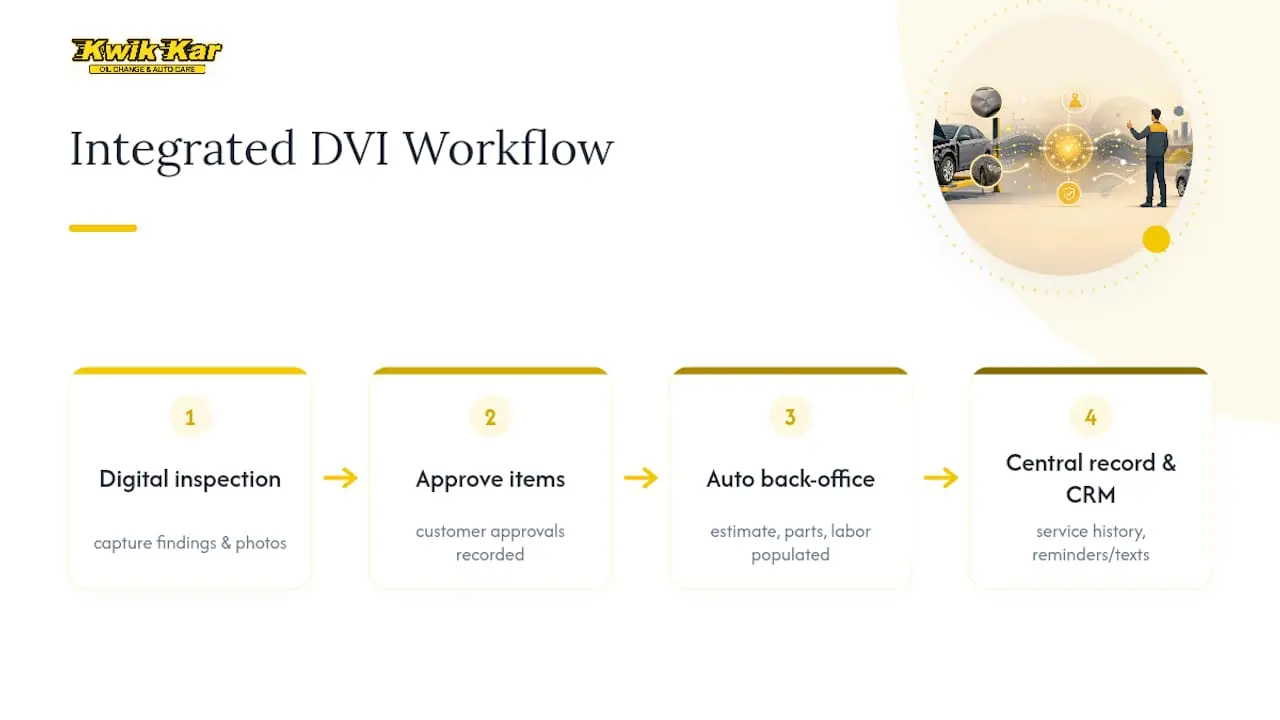
Customer relationship management integration adds another layer: automated reminders for deferred items, follow-up texts when a yellow-rated part crosses into red territory, and a searchable record if you call to ask what was found six months ago. Shops running disconnected systems tend to lose that thread, which is part of why ROI on DVI adoption depends heavily on integration and volume, not just on having a tablet in the bay. A shop with strong software integration and trained advisors converts inspection findings into approved work faster than one still bridging systems by hand.
Data Security and Privacy in Digital Vehicle Inspections
Your DVI report contains more than a list of worn parts. It typically includes your name, phone number, email, vehicle identification details, and sometimes payment information tied to the repair order, all of which makes data handling worth a second thought.
Reputable shop software encrypts report data in transit and at rest, and access to your full service history is generally restricted to staff who need it for your visit. Ask your shop whether report links expire after a set period and whether photos are stored on a secure server rather than a personal device. A shop that can answer those questions clearly is usually one that has thought through its data practices rather than bolted on an app for the sake of appearances.
Text and email delivery also introduce a privacy consideration worth knowing about: a report link sent to the wrong number or a shared inbox could expose your vehicle and contact details to someone else. Confirm your contact information at drop off, and don’t hesitate to ask your advisor to resend a report if you’re unsure the first one reached the right device. None of this should scare you away from digital reporting. Paper tickets get lost or handed to the wrong customer just as easily, and a digital record at least gives you a way to verify who accessed what and when.
Training and Certification for Technicians Performing DVIs
A tablet doesn’t make an inspection accurate. The technician holding it does. Running a useful DVI requires the same underlying mechanical knowledge as any thorough inspection, plus a working familiarity with the reporting software itself.
ASE certification remains the industry benchmark for verifying that a technician understands the systems they’re inspecting, from brake hydraulics to suspension geometry. That mechanical foundation matters more than familiarity with any particular app, since a technician who doesn’t know what a healthy CV joint looks like won’t photograph the right thing even with the best camera in hand.
Software training closes the other half of the gap. Technicians need to know which angle actually shows a defect clearly, how to write a note that explains a measurement rather than just labeling something “bad,” and how to apply condition ratings consistently so a yellow tag means the same thing on Tuesday as it did on Monday. Shops that skip this training end up with inconsistent reports where one technician’s yellow is another’s red, which erodes the trust a DVI is supposed to build in the first place. The strongest DVI programs pair certified technicians with ongoing coaching on report quality, not just a one-time software walkthrough.
Challenges and Limits of Implementing DVIs in Automotive Shops
Rolling out digital inspections isn’t as simple as handing every technician a tablet. Shops run into a handful of predictable friction points along the way.
Cost and adoption speed top the list. Software licensing, tablets, and the time it takes to train an entire team to use a new workflow consistently all add up before a shop sees the payback. That payback tends to arrive fastest at higher volume, with DVI adoption paying off most reliably at higher repair order volumes and moderate average ticket sizes, which means a low-volume shop may take longer to see the same return.
Technician resistance is another real hurdle. Experienced techs who have run visual inspections for years sometimes see photo documentation as extra work rather than a communication tool, especially if the software feels clunky or slow on the shop floor. Inconsistent execution follows close behind: without clear standards, one bay might produce detailed, well-lit photos with specific notes while another produces rushed, unclear shots that don’t help the customer at all.
Connectivity and hardware issues round out the list. A tablet with a cracked screen or spotty shop Wi-Fi turns a fifteen-minute inspection into a thirty-minute headache. None of these challenges are reasons to skip digital inspections. They’re reasons to expect a real transition period rather than assuming a new app fixes the process overnight.
Best Practices and Examples of Successful DVI Adoption
The shops that get the most out of digital inspections share a few habits that separate a genuinely useful report from a box checked for compliance.
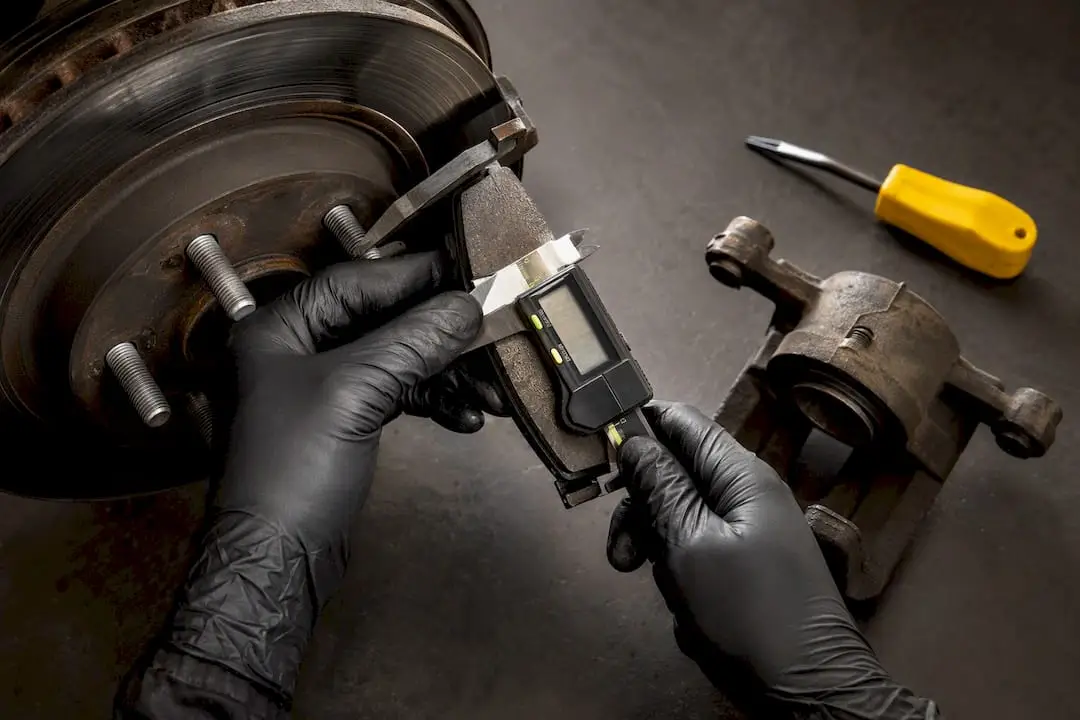
Consistency in photo quality stands out first. The best programs train every technician to capture the same angle and lighting for common items, like a brake pad measurement or a tire tread gauge reading, so customers see comparable evidence regardless of who worked on their car. Pairing every photo with a written note that includes an actual measurement, rather than a vague label, turns a picture into something a non-mechanic can genuinely evaluate.
Tight integration between the inspection tool and the estimate is another hallmark of shops that see strong results. When an approved item flows directly into the repair order without manual re-entry, approvals happen faster and fewer items slip through the cracks. Shops that layer in automated follow-up, texting a customer when a previously yellow-tagged part needs revisiting, turn a one-time inspection into an ongoing maintenance relationship rather than a single transaction.
Finally, the strongest programs treat the DVI as a training tool for advisors as much as a customer communication tool. Advisors who understand how to translate a red-tagged photo into a calm, specific explanation build far more trust than a report link alone ever could, no matter how good the software behind it is.
What Actually Matters When You’re Evaluating a DVI
Most advice about digital inspections focuses on the technology, the app, the tablet, the photo quality. That’s the wrong starting point. The technology is genuinely commoditized at this point; what separates a useful inspection from a wasted screen tap is whether the shop trained its people to use it well.
A blurry photo with a one-word label tells you almost nothing, even on the fanciest reporting platform on the market. A clear photo paired with a specific measurement and a plain-language note, delivered by an advisor willing to explain the difference between “needs attention now” and “worth watching,” is what actually earns your approval and your trust. That’s a people problem dressed up as a software problem, and readers evaluating a shop should ask about training and workflow discipline before they ask which app the shop uses.
The other overlooked point: a DVI’s real value compounds over multiple visits, not a single report. A single photo of a worn belt is useful once. A service history that tracks that belt’s condition across three visits is what actually helps you plan and budget instead of reacting to the next breakdown.
— Kwik Kar
Book a Digital Vehicle Inspection at Kwik Kar in Richardson
If you’ve read this far, you know what separates a genuinely useful inspection from a report you skim and ignore: clear photos, real notes, and a shop willing to walk you through what a red tag actually means. That’s the standard we hold ourselves to for every vehicle that comes through our bays.
Our ASE-certified technicians document findings the same way this article described, photo by photo, tied directly to your repair order, so nothing you approve is a surprise. Whether you need a routine oil change, brake service, or a full diagnostic workup, you’ll see the same evidence our certified technicians rely on to make their recommendations. Drivers who want to see the shop and equipment behind those reports can browse our service gallery before their visit. Ready to see your vehicle’s condition in plain terms instead of guesswork? Schedule your next service with Kwik Kar Oil Change & Auto Care in Richardson today.
Sources
- What is a digital vehicle inspection (DVI) and how does it benefit your auto repair shop? — AutoFlow
- Digital vehicle inspections build trust and healthier bottom lines — Mitchell 1
- Virtual vehicle inspection vs. physical: which one should you trust? — DriveReady
- 5 benefits of digital vehicle inspections — Tekmetric
FAQ
What Is a Digital Vehicle Inspection?
A digital vehicle inspection is a photo and video backed check a technician performs using a tablet or phone, rating each component green, yellow, or red before sending the report to your phone for review and approval.
Is a Digital Vehicle Inspection the Same as a DVIR?
No. A DVI is a voluntary, customer-facing shop inspection, while a DVIR is a mandatory commercial driver report governed by federal trucking regulations, and the two serve completely different purposes.
Can You Do Car Inspections Online?
Virtual inspections can confirm surface-level items like lights, wipers, and visible tire wear from photos or live video, but underbody damage, suspension issues, and emissions testing still require a physical, in-person inspection.
What’s the Best Free Digital Vehicle Inspection App?
There’s no single free app that fits every shop, since most professional DVI platforms are subscription tools built into shop management software rather than free consumer apps. Ask your shop which platform they use and whether you’ll receive reports by text or email.
Does a Digital Vehicle Inspection Cost Extra?
Many shops include the digital inspection as part of standard service visits like oil changes or diagnostic appointments rather than charging a separate fee, though it’s always worth confirming with your specific shop.